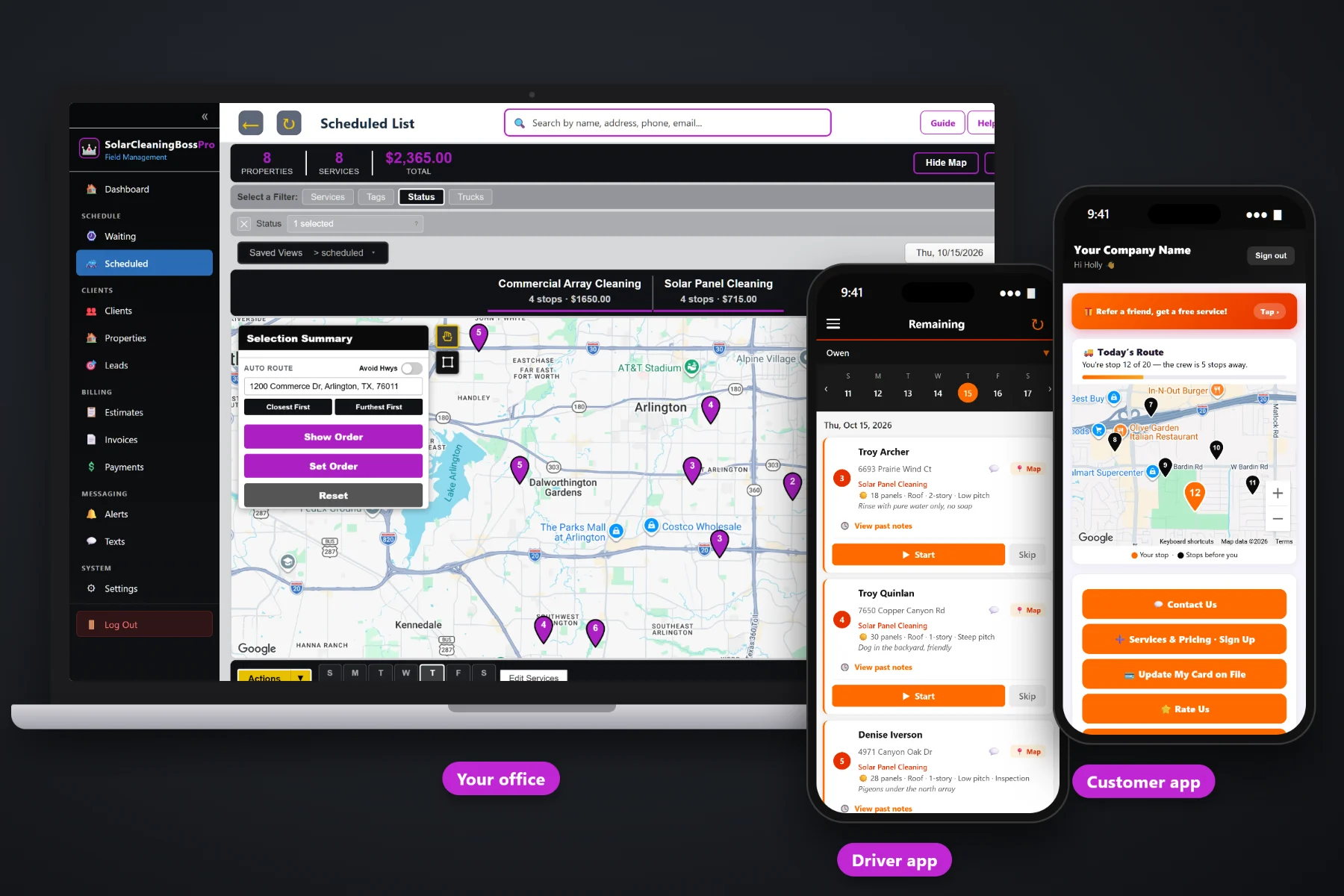
Commercial solar is a different job from a rooftop at a house. A warehouse roof with a hatch and a sign-in sheet, a carport over a full parking lot, a school that can't have a crew on the roof during class, a property owner with nine buildings who wants one bill. SolarCleaningBossPro keeps every address under one account, brings quarterly cleanings due on their own, puts roof access notes on the tech's phone, saves proof-of-service photos with each job and sends one monthly statement per account.
Plans start at $59/month, and commercial accounts work on every plan. Many addresses under one client, monthly statements, quarterly plans, access notes and photos come with the platform. To see how commercial work fits with residential rooftops, routing and the tech app, start at SolarCleaningBossPro and then come back here for the commercial side.
A property owner with a warehouse, two office buildings and a carport is one client with four addresses, each with its own panel details.
Set the account to Monthly and every site cleaned that month lands on one statement, each line labeled with its address.
Set 90 days between visits and each array lands on the Waiting List when it comes due. Nobody has to remember the school.
Hatch location, who holds the key, where to sign in and which spigot to use, on the tech's phone every visit.
Before-and-after photos saved with each job, so the owner who never climbs the roof can see the work.
Two-way texting from the office, so the facility manager can answer “Is the hatch open yet?” without a phone call.
Commercial jobs fail on the small things: the key is at the front desk, the hatch is in the back stairwell, the spigot is locked, and the manager wants the crew signed in. SolarCleaningBossPro keeps the panel count, mount, roof and access notes on each address, so they show on the tech's phone every quarter without anyone digging up last year's email.
The hard part of a commercial account is the first visit: learning the site, the access and who signs off. After that, the work repeats. SolarCleaningBossPro holds what you learned on the address so every visit after the first one runs like a known route.
One client, every address. Tag it Commercial, add custom fields for the manager or PO details, and enter the panel details on each site.
Build the estimate from your service list and send it. The manager approves online and the approved estimate becomes the scheduled job.
Quarterly arrays come due on the Waiting List map after 90 days. Assign them to the commercial truck and set route order.
The crew works from the phone, takes before-and-after photos, and the account gets one statement at the end of the month.
A residential customer is one address and one card. A commercial customer is a list of buildings, a manager, an accounts payable inbox, a set of keys and a schedule that has to dodge business hours. Generic field-service software treats each building as a separate customer and each visit as a separate bill.
Ask anyone who has picked up a few commercial arrays and you will hear the same story: a spreadsheet with a tab per building, a key that lives in somebody's glovebox, a manager who changed jobs and took the hatch instructions with her, and an accounts payable department that sent back six separate invoices because they wanted one. Then a quarter goes by and nobody remembers the church was due.
That information belongs on the account and its addresses. When it lives there, any crew can run the commercial route and the bill goes out the way the customer asked for it.
SolarCleaningBossPro keeps the account, its sites, its access notes, its photos and its statements in one place, from the first quote to the paid bill.
Every tool here exists to win commercial accounts, run them on time every quarter and bill them the way facility managers and owners want to be billed.
One property owner, every building. Each address keeps its own panel details and access notes.
Accounts set to Monthly get one statement covering every site, each line labeled with the address.
Set by minimum days between visits, so commercial arrays come due on the Waiting List on their own.
Pins colored not due yet, due now and overdue past a 7-day grace, so a late array stands out.
Panel count, mount (roof, ground mount, carport), roof stories and pitch, and extras on every job.
Hatches, keys, sign-in, spigots and gate codes on the address, shown on the tech's phone.
Per-panel pricing, minimums and add-ons from your service list. Approved estimates become scheduled jobs.
Before-and-after photos saved with each job for owners and managers who never see the roof.
Text facility managers from the office. Replies come back to the office, not to one tech's phone.
Tag accounts Commercial and add custom fields for the details your commercial customers care about.
Look at your work and billing by client, so you know which accounts carry the business.
Run one truck on homes and one on commercial arrays, each with its own route order.
Closest First or Furthest First from the shop, or set the order by hand around business hours.
Hours recorded on the phone and crew locations on the office map during long commercial days.
Bring a list of sites over by CSV. Imported addresses are placed on the map automatically.
Start $59, Pro $89 and Crew $199 per month, with commercial accounts on every plan.
Commercial arrays usually run on a quarterly plan. Set 90 days between visits and each site shows up on the Waiting List map when it comes due, colored by status so an overdue warehouse is hard to miss. The office drops the due sites onto the commercial truck, orders the day around opening hours and loading docks, and the crew's phones show the same order. For the full walkthrough, read Commercial Solar Cleaning Software: The Complete Guide to Running Commercial Array Accounts.
The person paying for a commercial cleaning is rarely standing on the roof. They need to know the crew showed up, what was cleaned and what it cost. Before-and-after photos are saved with each job, two-way texting keeps the facility manager in the loop, and accounts set to Monthly get one statement that lists every site by address. Owners can compare their own production app before and after a cleaning if they want to see the difference for themselves.
Pick the plan that fits your operation. Every plan starts with a 14-day free trial and no credit card.
Compare plans on the pricing page.
Yes. A client can have as many addresses as they own or manage. Each address keeps its own panel count, mount, roof details, extras and access notes, and shows on the map and the Waiting List on its own.
Yes. Set the account to Monthly billing and it gets one statement each month covering every building or site cleaned that month, with each line labeled with the address.
Set the plan to 90 days between visits. When a site comes due it lands on the Waiting List map, colored due now, and turns overdue after a 7-day grace. The office assigns it to a truck and a day.
In the access notes on the address. They show on the tech's phone under the address every visit, so the crew knows where the key is and where to sign in before they park.
Honestly, no. Large utility-scale contracts with their own bidding, compliance and reporting systems are outside the typical use. SolarCleaningBossPro is built for companies cleaning homes, businesses, carports, farms and property owners with many buildings.
Start is $59/month, Pro is $89/month, and Crew is $199/month. Commercial accounts work on every plan, and every plan starts with a 14-day free trial with no credit card.
Commercial accounts are one piece of how SolarCleaningBossPro runs a solar cleaning company. For residential rooftops, routing, the tech app, quotes and billing, see the full SolarCleaningBossPro platform overview.
Practical reading on winning commercial work, warehouses, carports, schools, churches, farms, property owners with many buildings, monthly statements, quarterly plans, roof access, photos, quoting, crew size and keeping accounts renewing.
Many sites under one account, quarterly plans that come due on their own, roof access notes on every phone, proof-of-service photos and one monthly statement per account. Try SolarCleaningBossPro free for 14 days.