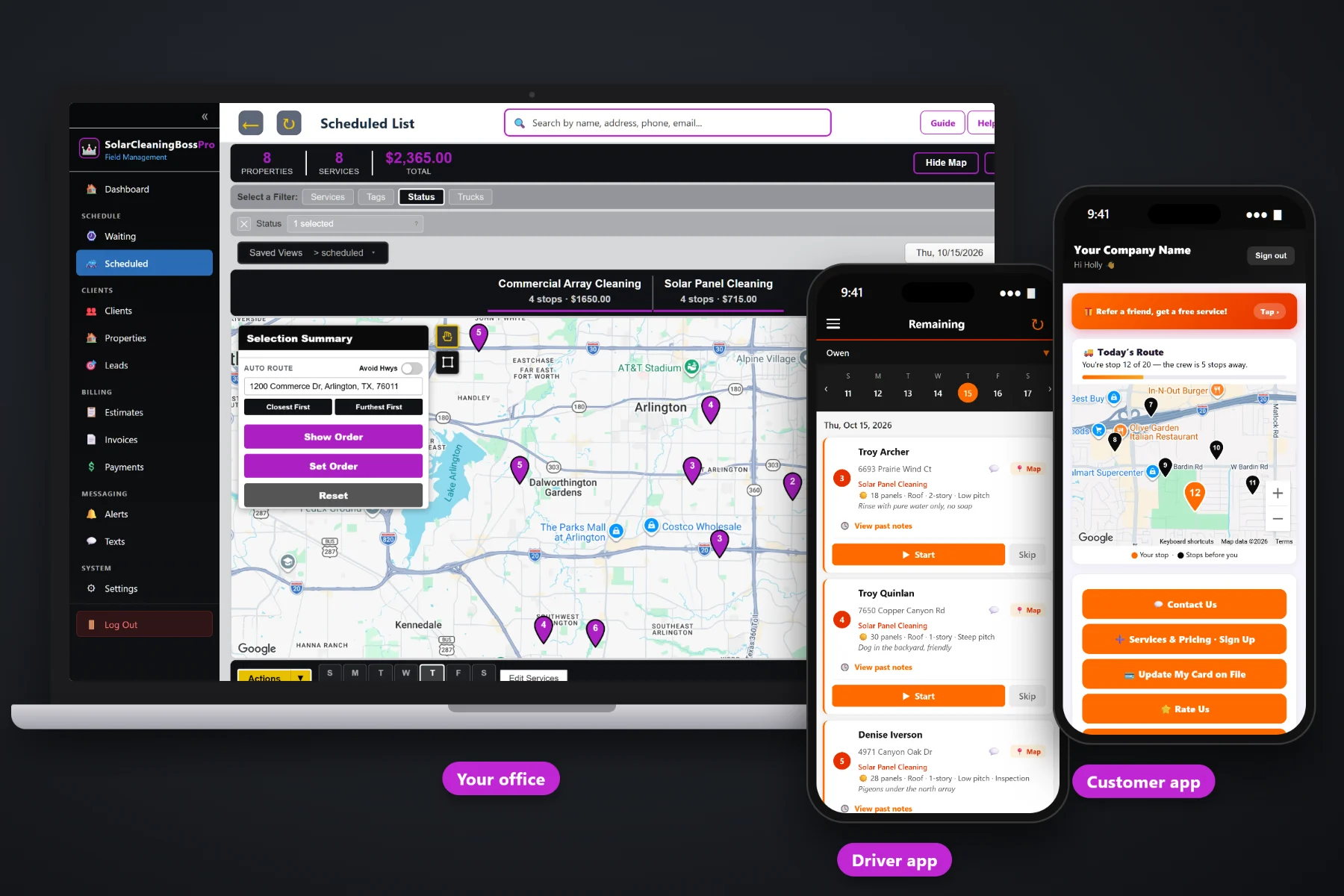
A solar cleaning day is a string of roofs, ground mounts and carports spread across town, each with its own panel count, its own pitch, its own spigot and its own gate. SolarCleaningBossPro puts every cleaning that came due on a live Waiting List map, lets you drop jobs onto a truck and a day, auto-routes them Closest First or Furthest First from the shop, and sends that same order to the tech's phone with panel details and access notes on every stop.
Plans start at $59/month, and routing and scheduling are part of every plan. The Waiting List map, the dispatch board, auto-routing, the tech's ordered job list, crew GPS and the customer's live route view come with the platform, not as an add-on. For the whole picture, including quotes, recurring plans and billing, start at SolarCleaningBossPro and then dig into the routing side here.
Every cleaning that came due on one live map, pins colored not due yet, due now and overdue, so you build routes from what is actually owed.
The dispatch board shows jobs by day, filters by truck, and keeps the homes truck and the commercial array truck on their own lists.
Order a truck's stops Closest First or Furthest First from the shop in one click, then adjust the route order by hand.
“24 panels · Roof · 2-story · Low pitch · Bird proofing” under the address, so you can size a day before it starts.
On-the-way and arrived texts go out as the tech works the route. Customers pick night before, when they're next, and arrived.
Trucks show on the office map, so the office knows who is closest when a same-day request comes in.
Twelve panels on a single-story low-pitch roof is a short stop. Sixty panels on a steep two-story roof with bird proofing is half a morning. SolarCleaningBossPro shows the panel details under each address on the lists, so the person building tomorrow's route can see what each stop really takes instead of treating every roof the same.
Most solar cleaning owners build routes at the kitchen table after a long day on roofs. SolarCleaningBossPro shows what came due, where it is and how big each job is, so building the next day is a short job on a map instead of an evening with a spreadsheet and a road atlas.
Enter each address with its panel count, mount, stories, pitch, extras and access notes, or bring a list in by CSV import and the addresses land on the map.
Homes twice a year or yearly, commercial arrays quarterly. Each plan comes due by its minimum days between visits and appears on the Waiting List.
Pick due jobs off the map, put them on a truck and a day, then auto-route Closest First or Furthest First from the shop.
The tech's phone shows the same stops in the same order, with navigation, panel details and automatic texts to each customer.
A generic calendar gives each job a time slot and an address. A solar cleaning job is a panel count, a roof pitch, a story count, a spigot location and a cleaning that has to happen before the panels bake in the afternoon sun. A tool that only knows the address cannot tell you how many roofs fit in a day.
Ask a solar cleaning owner how scheduling really works and you will hear the same story: a spreadsheet of last cleaning dates nobody updates, a whiteboard of the week that gets wiped by Wednesday, and a truck that drove from one side of town to the other and back because the stops were in the order the customers called, not the order of the streets. A steep two-story roof booked at 2pm in July. A homeowner who was due in March and never got a call.
That information belongs on a map, tied to each address and each plan. When due dates, panel details and locations live in one place, building a tight route becomes a matter of looking instead of remembering.
SolarCleaningBossPro keeps the customer, the panels, the plan and the route in one place, from the first quote to the paid invoice.
Every tool here exists to get more roofs, ground mounts and arrays cleaned in a day with less driving, fewer missed due dates and fewer calls asking when the crew is coming.
A live map and list of every cleaning that came due, pins colored not due yet, due now, and overdue past a 7-day grace.
Set minimum days between visits, such as 90, 180 or 365, and each cleaning comes due on its own. One-time cleanings too.
The Scheduled List shows jobs by day and filters by truck, so each crew's day is easy to read.
Order a day's stops Closest First or Furthest First from the shop with one click.
Set the route order by hand when you know a better sequence, such as steep roofs first while it is cool.
Assign employees to trucks. A common setup is one truck on homes and one on commercial arrays.
Panel count, mount, stories, pitch and extras under each address on the lists and on the tech's phone.
Spigot location, roof access side, gate code and dog notes stay on the address for every visit.
Each tech sees their own stops in order with a navigation button, Start, Skip and Complete.
Sent automatically as the tech works the route. Replies come to the office through two-way texting.
In the customer app: "You're stop 12 of 20 — the crew is 5 stops away."
Truck locations show on the office map while crews are working.
A skipped stop comes back to the office with the tech's note, ready to move to another day.
Bring in your customer list and the addresses are placed on the map automatically.
Used in the US, Canada, Australia, New Zealand and the UK, billing customers in their own currency.
Start $59, Pro $89 and Crew $199 per month, with routing and scheduling on every plan.
Every route starts on the Waiting List, a live map of the cleanings that came due. Twice-a-year homes, yearly homes and quarterly commercial arrays come due on their own from each plan's minimum days between visits. The office picks a cluster of due pins, assigns them to a truck and a day, auto-routes Closest First or Furthest First from the shop, and the tech's phone shows the same order. For the full walkthrough, read Solar Cleaning Route Scheduling: The Complete Guide to Planning Days, Trucks and Routes.
A solar cleaning stop goes faster when the side gate is open, the dog is inside and the hose is off the spigot. Night-before reminders, on-the-way and arrived texts, and a live route map in the customer app tell the homeowner when the truck is coming. Replies land in the office through two-way texting, and after the job the invoice, online payment and card on file are waiting in the customer app.
Pick the plan that fits your operation. Every plan starts with a 14-day free trial and no credit card.
Compare plans on the pricing page.
Recurring plans come due on their own based on the minimum days between visits you set, such as 180 days for twice-a-year homes or 90 days for quarterly commercial arrays. Every cleaning that came due shows on the Waiting List map and list. You pick the ones you want, assign them to a truck and a day, and they appear on the dispatch board and the tech's phone.
On the dispatch board you can order a truck's stops for the day Closest First or Furthest First from the shop. You can also set the route order by hand, for example to put steep two-story roofs early while the panels are cool.
Yes. Employees are assigned to trucks and the dispatch board filters by truck. A common setup is one truck running homes and one running commercial arrays.
Move the day's jobs to another day on the board and text the affected customers from the office. If a tech has to stop partway, they tap Skip with a note and the office sees which stops still need a new day.
Yes. Customers choose alerts for the night before, when they're next, and when the tech arrives. On-the-way and arrived texts go out automatically as the tech works the route, and the customer app shows a live map with their stop number.
Start is $59/month, Pro is $89/month, and Crew is $199/month. Routing and scheduling are on every plan, and every plan starts with a 14-day free trial with no credit card.
Routing is one piece of how SolarCleaningBossPro runs a solar cleaning company. For quotes, recurring plans, the tech app, commercial accounts and billing, see the full SolarCleaningBossPro platform overview.
Practical reading on the Waiting List map, route order, trucks, early starts, heat, wind and rain days, dirty seasons, roofs per day, neighborhoods, customer texts, crew GPS, the dispatcher's morning and moving off paper.
Every due cleaning on a map, every truck in route order, panel details on every stop and automatic texts to every customer. Try SolarCleaningBossPro free for 14 days.